Julie Gumm - Author, Speaker, CliftonStrengths Coach

  • Book
  • Topics
    • Adoption Resources
    • Affording Adoption
    • Financial Health
  • Speaking/Coaching
  • About/Contact

How we paid for our debt-free adoption

07.25.2012 by juliegumm@yahoo.com //

Mark and I are on a little kid-free giveaway so this is a repost.

It cost us about $28,000 to adopt both kids, including travel (2 tickets round trip + 2 tickets one-way home; this was before Ethiopia was a 2 trip country).

We didn’t start down this road without a plan. First, we had approximately $10,000 in savings. Then, as I mentioned, we had just finished paying off our house around the time we started the process.

For the last 2 1/2 years we had been throwing every extra penny we had at the mortgage – to the tune of about $2,200 a month. With it paid off, we could use that money for the adoption. We estimated that the process was going to take us 6-9 months (it was actually 12) so that would mean $13-19,000. Depending on the time frame we knew we might need to come up with a few extra thousand dollars but knew that we could do that pretty easily with some belt-tightening and fundraising.

That was the PLAN.

But, well, God had OTHER plans. About 2 months into the process Mark left his job. Probably seems like a totally crazy thing, but we knew it was what God wanted him to do. On the one hand I was working again and making enough money to support us (thankfully we didn’t have many bills now). On the other hand that extra $13-19k was not going to be there.

And I will admit, I fell off the bandwagon. I said “well, if we have to take out an interest-free adoption loan, we’ll just pay it off as soon as we can”. But that didn’t sit right with us. And then God used Dave Ramsey to speak incredible truth into my life once again. (You can read about that here.) And so we renewed our commitment to do this adoption debt-free. It just meant God was going to have to show up.

And we were going to have to work hard.

We didn’t get any anonymous $5,000 checks in the mail and to be honest, this list is, at best, approximation of how we paid for it. All I know is that EVERY time we needed to write a check (because thankfully the costs are spread out), we had the money.

Savings $10,000
Budget tightening and savings during process $2k
Severance package (TOTALLY not expected since Mark resigned) $4k
Garage sale $2,300
Mark selling stuff on ebay $2k
Julie’s freelance income (God brought a ton of jobs) $5k

We were down to the wire with the last $3k we needed for travel. We had said early on that one thing we could do, was sell Mark’s car. He worked from home and we knew that we could get along with one car until we could save up cash to buy a replacement. His older Toyota Camry (because we only drive paid-for cars) was worth about $4-5k. But God pulled off a miracle at the last little bit and gave us exactly the $3k we needed from an unexpected source.

This is just OUR story. There are so many more stories of people who have done this all kinds of different ways. Some of them have started with NOTHING saved and God has still showed up big time.

It’s not easy. Debt is always going to SEEM like the easy way out. But if you are willing to work at it, and make some sacrifices, it can be done!

Categories // Affording Adoption

How you can use Amazon to earn $1,000+ for your adoption fund

07.18.2012 by juliegumm@yahoo.com //

How to use amazon.com to make $1,000 for your adoption fund

NOTE: Please read the update post here for important information about the restrictions of the affiliate program.

I mentioned the Amazon Affiliates fundraising idea in “Adopt Without Debt” almost as a side note. I knew a couple people who had done it and made a few hundred dollars. And money is money, right?

But now I’m telling you, this idea REALLY works! Stacy and Rodney have gone gangbusters with this idea and already made $1,400 for their adoption fund. Their friends and family have used their Amazon affiliate link to purchase over $20k worth of merchandise.

I have a quick link in my Safari bookmark bar that says “Amazon-Kennedy”. Every time I need something on Amazon I use the link. I don’t want to know how much of that $20k I’m responsible for personally 🙂

This is a NO-BRAINER! After you have it set up all you need to do is advertise it and remind people. Here’s a couple ideas:

  • Post it on your Facebook profile and then post to FB at least once a week. (Once Stacy posted some of the unusual stuff people had purchased – they can’t see who purchased it. That was kind of fun.)
  • Tweet it, of course
  • Put it in the sidebar of your blog
  • Send an email to friends and family with the link. Encourage them to add it as a quick link in their browser.
  • Stacy sent her Christmas cards out before Thanksgiving with some cute cards with their link. GENIUS!

So that you don’t have ANY excuses, I’m even going to walk you through the set up process.

1. Go to https://affiliate-program.amazon.com/

2. Click the “Join Now for Free” button.

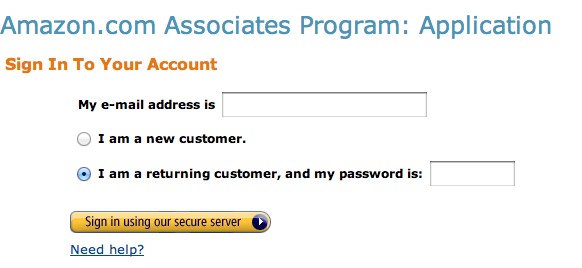
3. Sign in to your regular Amazon.com account. If you don’t have one click “I’m a new customer.”

4. Verify your account information – mainly where payment should be sent.

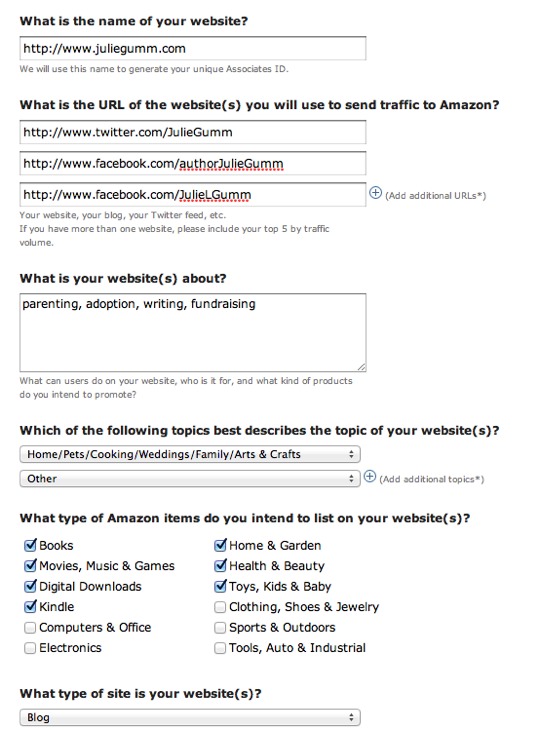
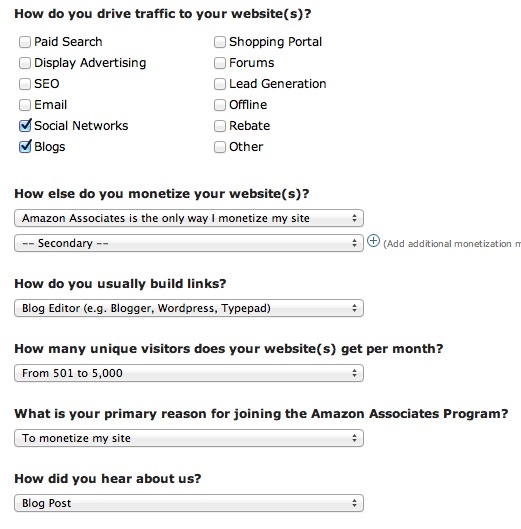
5. Tell Amazon about your website. This form is pretty self-explanatory and don’t worry. Most of the answers are just for their research purposes. (You can click on the images below to enlarge if you have questions.)


If you don’t have a blog, don’t worry. I tested it with just putting my Facebook unique URL in the “name of your website” link and it worked fine.

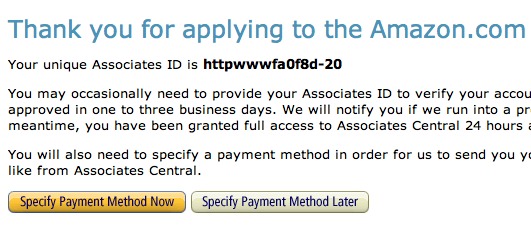
6. Next you’ll get a page with your unique Amazon ID. It’ll look weird like “httpwwwfa0f8d-XX”. Click the “Specify Payment Information” button.

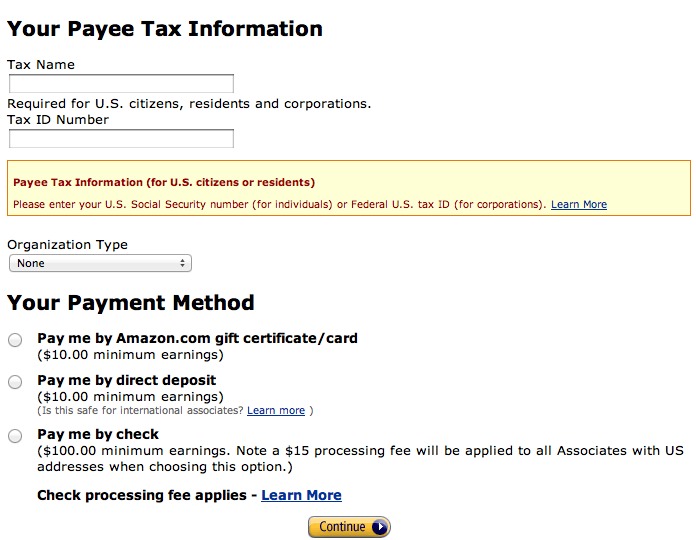
7. Fill out the form. Tax Name is just going to be your name as it appears on your taxes. Tax ID Number is your social security number. Yes, this counts as income and you will need to report it on your taxes. Under “Organization” select Individual. Then select your payment method. Direct deposit makes the most sense as they don’t charge you a fee. If you select that it will expand and you will need your bank account information.

Congrats, now you’ll get to your Amazon Associates “dashboard”. There’s all kinds of information on how to link to specific products and embed stuff into posts. It’s great if you want to dig in to it (and if you frequently mention books I would). But for now you don’t need to bother with it.

8. Go back to Amazon.com. Now you’ll notice the “affiliates” grey bar at the top of your browser window.

9. Click the “Link to this page” (while you’re on the home page). You’ll get this pop-up box. Note the text I highlighted below in between the quote marks. Copy just that portion. That is your affiliate link. Of course that’s super long and not very user-friendly but hang on.

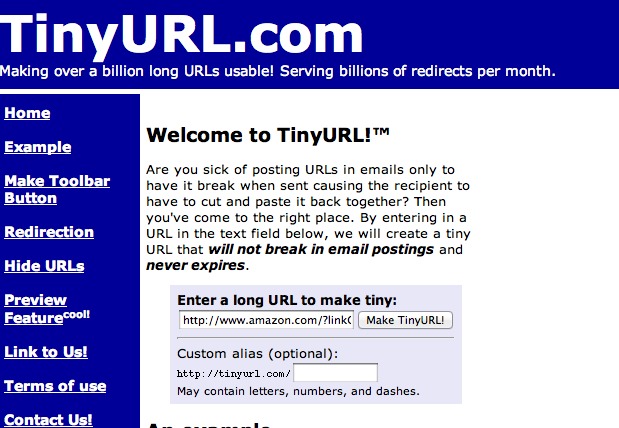
1o. Next we’re going to get a shortened URL. There’s a number of services you can use – bit.ly etc. TinyURL is an easy one. Go to TinyURL.com and paste that link into the box that says “Enter a long URL to make tiny” then click the “make tiny” button.

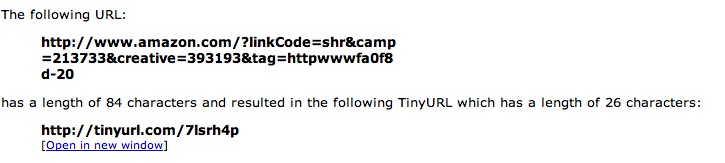
You’ll get something like this

Copy the tiny url and use it in Tweets, FB, etc. Paste it into a text document on your desktop or something for easy reference.

For printing business cards: Vistaprint.com offers 250 free business cards you could use to make up some cards to hand out to friends.

What other “affiliate” programs are you using to raise funds for your adoption?

Categories // Affording Adoption

What adoption grants am I eligible for?

07.13.2012 by juliegumm@yahoo.com //

As we discussed yesterday, there are three types of adoption grants. But how do you figure out which ones to apply for? Because there’s 60 plus adoption grants available.

I’m going to point you to my favorite resource on adoption grants. Cherri Walrod is an adoptive mother and founder of Resources4Adoption.com and I’ve dubbed her the Adoption Grant Guru.

She spends HUNDREDS of hours meticulously researching adoption grants – finding new ones AND monitoring existing ones. She has gathered all this information and created a Grants & Loans chart. It allows you an easy way to access grants that you are eligible for.

  • Which sources ARE accepting applications?
  • Which sources are on hold?
  • Which sources are outdated or no longer active?
  • I am single, which grants should I apply for?
  • Which states have adoption grants available to their residents?
  • Are there any grants for other religious affiliations beside Christian?
  • Does anyone offer grants for domestic or private adoptions?

Visit her site and you can see a sample chart. The full chart can be purchased for $20 – money well spent when it will save you HOURS of research.

Resources4Adoption.com

Categories // Affording Adoption

  • « Previous Page
  • 1
  • …
  • 17
  • 18
  • 19
  • 20
  • 21
  • …
  • 44
  • Next Page »

Financial Freedom

Taking Advantage of The Housing Boom

The next huge step in our financial journey really came in 2004 when the housing market in Phoenix went absolutely crazy. The house that we bought for $199,900 over a year earlier was suddenly worth about $350,000. Crazy right? So of course Mark starts talking about selling and I start rolling my eyes at him. […]

I Met Dave!

We interrupt our normally scheduled post for this breaking news… I met Dave! Yesterday I got the opportunity to volunteer at the Dave Ramsey Live Event in Phoenix. It was this same event 10 years ago that changed our lives. Before the show Dave came around and greeted every one of the 60 or so […]

Copyright © 2026 · Modern Studio Pro Theme on Genesis Framework · WordPress · Log in